10. Collision 2: Define Boxes
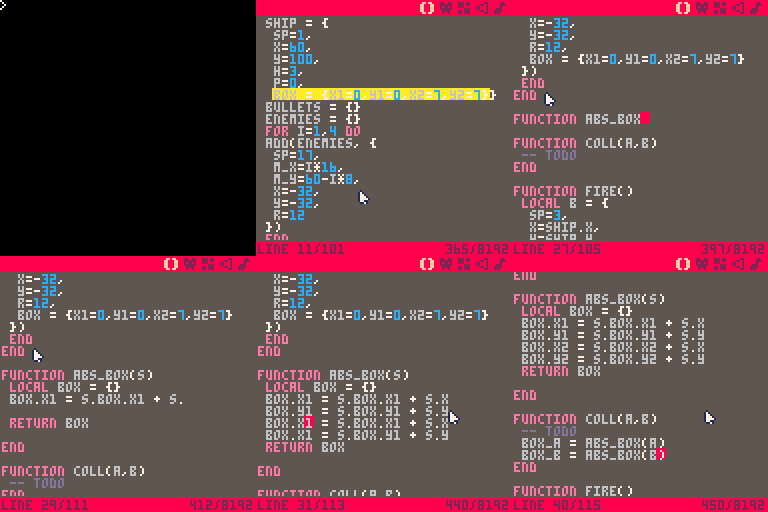
OK. This is a very code heavy step. It is merely setup for the next step.
Start by adding a box property to the ship table. This defines the
collison box of the ship. If the bounds of this box overlap with the bounds
of an enemy's box, the player should lose a heart.
Add a box property to the enemies.
Next, we add a box to our bullets. If a bullet's box intersects with an enemy's box, the enemy should receive damage or be destroyed. Bullets are destroyed by the impact.
This bounding box is smaller than the one for either enemies or the ship since the bullet doesn't fill its tile.
The function abs_box goes above the placeholder coll function we added in
the last step. The box properties we added just tell us the size of the box.
To actually compute whether two objects on screen intersect, we need the pixel
coordinates of the box.
That is what this function does. It adds an object's x and y coordinates to
the box's properties. It translates from the relative coordinates of the
box to its absolute coordinates.
This next change sets us up for calculating whether there was a collision
between two boxes. It takes two entities (A and B) and gets the screen
coordinates of the bounds of their bounding box.
What do we have to show for all that typing? Nothing (just yet), at least, not that we can see visually. We did plenty conceptually.
We added bounding boxes to our ship, enemies, and bullets. We can compute the
absolute (screen) coordinates of the bounding box for one of these entities. We
also updated our coll function to compute the bounding box for two different
entities which will be used to start causing damage to the ship, enemies, and
bullets.